
A good short-throw projector for a home golf simulator runs £550 to £900 for a lamp-based 1080p model, £1,000 to £1,800 for a laser unit that will never need a bulb change, and £2,800 or more for a premium 4K build. Pair that with an impact screen at £70 to £350 depending on size and quality, and projection is typically the second-biggest line item in a simulator budget after the launch monitor itself.
This guide covers the specific models worth buying in the UK right now, and what actually matters when choosing between them, not just the spec sheet numbers.
Why short-throw specifically
A standard projector needs several metres of distance to fill a large image, which most garages and simulator rooms simply don’t have without mounting it directly behind the hitting area, right in the path of the ball. Short-throw projectors, with throw ratios roughly between 0.5:1 and 0.9:1, solve this by producing a large image from very close range, usually mounted just above and behind the golfer, out of the swing path entirely.
The picks at a glance
| Projector | Type | Lumens | Approx. UK price | Best for |
|---|---|---|---|---|
| BenQ TH671ST | 1080p lamp | 3,000 | £550-£700 | Tightest budgets |
| BenQ TH690ST | 1080p 4LED | 2,300 | £830-£1,100 | Blacked-out rooms |
| Optoma GT2100HDR | 1080p laser | 4,200 | £1,000-£1,450 | Best all-round laser value |
| BenQ AH500ST | 1080p laser, golf-specific | 4,000 | £1,200-£1,500 (get a quote) | Dedicated sim rooms |
| BenQ AH700ST | 1080p laser, golf-specific | 4,000 | £1,500-£1,800 (get a quote) | Premium 1080p, brighter rooms |
| BenQ LK936ST | 4K laser | 5,100 | £2,800-£3,500 (get a quote) | Premium 4K builds |
Prices reflect UK listings as of July 2026. The models marked “get a quote” sell mainly through specialist simulator retailers in the UK, where pricing moves around, so confirm a current figure before you budget around one.
Budget pick: BenQ TH671ST (£550-£700)
The TH671ST has been the default budget recommendation in the golf simulator community for years, and it still earns the spot: 3,000 lumens of brightness, 1080p resolution, a 0.69:1 throw ratio that produces a 100-inch image from about 1.5 metres, and input lag of 16ms in game mode, low enough that there’s no perceptible delay between your swing and the on-screen result.
Two caveats. It’s lamp-based, so budget £100-£300 for a replacement bulb every 2,000 to 5,000 hours of use. It’s also an ageing model now, so if a listing sits near the top of that price range, compare it against the laser options below before assuming the old default is still the best value.
Budget upgrade: BenQ TH690ST (£830-£1,100)
The TH690ST is the LED-based successor to the TH671ST, with an 8.3ms response at 1080p and a 20,000-hour light source, which means no bulb replacements at all. The catch is brightness. At 2,300 lumens it’s noticeably dimmer than everything else here, so it only makes sense in a properly blacked-out room. In a garage with a window or a light-leaking door, spend the extra on the Optoma below instead.
Best all-round laser value: Optoma GT2100HDR (£1,000-£1,450)
If your budget clears £1,000, this is the sweet spot for most UK builds. You get a laser light source rated for 20,000+ hours, a very bright 4,200 lumens that holds up in rooms with some ambient light, a 0.5:1 throw ratio that fills a 100-inch image from just over a metre, and a compact case that’s easy to ceiling-mount. Optoma’s ZH450ST is essentially the same projector with a higher contrast ratio, so if you find that one cheaper on the day, either is a good buy.
The golf-specific option: BenQ AH500ST and AH700ST (£1,200-£1,800)
BenQ now makes projectors specifically for golf simulators, and they solve real setup problems rather than just adding a golf badge: warp and blanking tools for aligning the image to your screen without losing resolution, colour modes tuned for fairway greens, and mounting options aimed at sim rooms. The AH500ST (4,000 lumens, 1080p laser) is the value pick of the pair for a dedicated sim room. The AH700ST adds better optics, HDR support and 8.4ms input lag. Both sell mainly through simulator retailers in the UK, so get a current quote rather than trusting a cached price. If the quote lands near GT2100HDR money, the Optoma remains the stronger pure value buy.
Premium 4K: BenQ LK936ST (£2,800-£3,500)
The jump from 1080p to 4K matters more for how the fairway and green textures render than for the core simulator experience, so treat it as a luxury rather than a necessity. If you’re making that jump, the LK936ST is the model the serious end of the community converges on: 5,100 lumens, which is bright enough for any garage, a 0.8:1 short throw, a laser light source, and a dedicated golf mode. The LG ProBeam BU53RG (5,000 lumens, 4K) is the main alternative at similar money.
Throw ratio: the 60-second version
The most common projector mistake in simulator builds is buying before measuring. The maths is one line: screen width multiplied by throw ratio equals the distance the projector needs to sit from the screen.
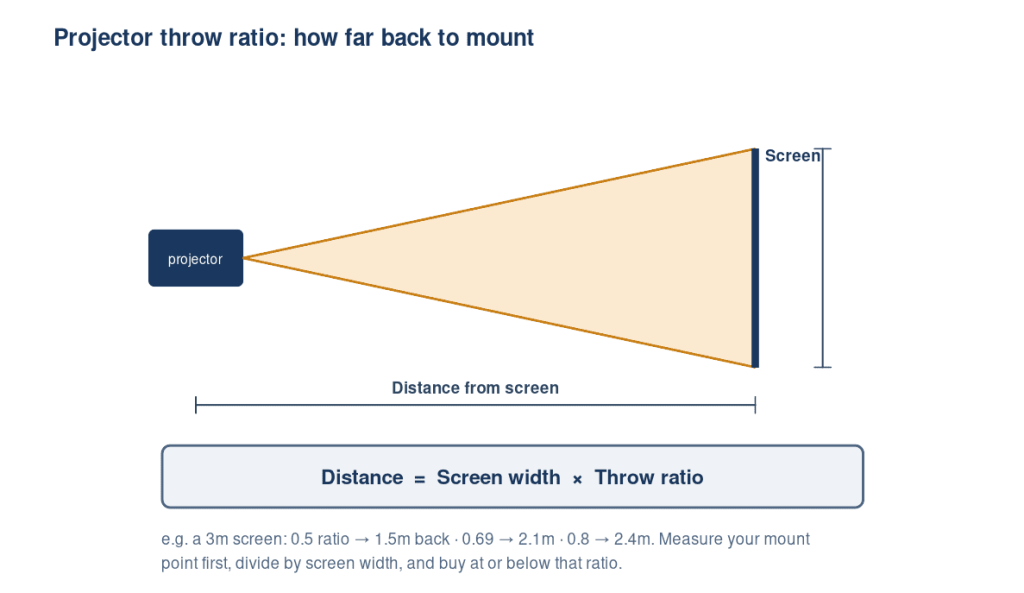
So for a 3-metre-wide image, a 0.5:1 projector like the GT2100HDR sits 1.5 metres from the screen, a 0.69:1 projector like the TH671ST sits about 2.1 metres back, and a 0.8:1 projector like the LK936ST sits 2.4 metres back. Measure the distance from your realistic mounting point to the screen, divide it by your screen width, and you have the maximum throw ratio you can buy. Optical zoom gives you some flexibility either side of that number. Avoid leaning on digital keystone correction, which costs you resolution.
Mounting: above and behind the golfer
Ceiling-mounting just behind the hitting position is the standard setup. It keeps the projector out of the swing path, avoids shadows because your body stays behind the light cone, and puts the lens close enough for short-throw ratios to fill the screen. Floor mounting in a protective enclosure works too, particularly with ratios of 0.5:1 or lower, but check your launch monitor’s position first, since floor units and floor-mounted projectors compete for the same space. Whichever you choose, confirm the position with the throw ratio maths above before drilling anything, and make a full practice swing to check for shadows before finalising.

What actually matters when choosing
Input lag, not just resolution. A projector with high input lag creates a noticeable delay between your swing and the ball flight rendering on screen, which matters far more to the experience than resolution does. Look for projectors rated at 16ms or lower in game mode. Everything in the table above qualifies.
Brightness for your room. A garage with any ambient light needs more lumens than a fully blacked-out room. 3,000 lumens is a reasonable baseline, and 4,000 or more buys you slack if your room isn’t perfectly dark. The TH690ST’s 2,300 lumens is the one entry here that demands a truly dark room.
Laser vs lamp, the running-cost question most buyers skip. A traditional lamp bulb typically needs replacing every 2,000 to 5,000 hours at £100-£300 a time, which sounds distant until you total up regular evening and weekend use over a couple of years. Laser light sources cost more upfront but are usually rated for 20,000 hours or more, long enough that most home users never replace one. If you’re planning to use the simulator several times a week rather than occasionally, it’s worth weighing the laser premium against the lamp replacements you’d otherwise be budgeting for over the same period.
Impact screens: the three tiers
Impact screens run £70 to £350 and up in the UK, and the price differences map to real construction differences rather than branding.
| Tier | Typical UK price | Construction | Trade-off |
|---|---|---|---|
| Budget | £70-£150 | Single-layer woven polyester | Louder on impact, more bounce-back, shorter life, visible weave up close |
| Mid | £150-£250 | Heavier tight-weave polyester with finished edges and eyelets | The value sweet spot for most home builds |
| Premium | £250-£350+ | Multi-layer, with an impact layer plus energy-dispersing backing | Quietest, near-zero bounce-back, sharpest image; more than casual use needs |
A higher-quality screen matters for two reasons beyond image clarity: it needs to absorb repeated ball impacts without degrading, and its surface texture affects how sharp the projected image looks under a bright projector. Match the screen’s aspect ratio to your projector output, 16:9 for wider rooms or 4:3 for squarer spaces, so you’re not paying for screen area the image never fills. In the UK, GolfBays sells screens in standard sizes, and Carl’s Place ships its Standard, Preferred and Premium range here. Both are safer buys than unbranded marketplace screens, which are the most common source of bounce-back complaints. For the full breakdown of screen materials, tiers and UK options, see our best golf impact screens guide. If you’re building your own enclosure rather than buying pre-built, see our DIY enclosure guide for how to mount and tension a screen properly. Tension matters as much as material.
Frequently asked questions
Do I need a 4K projector for a golf simulator? No. A good 1080p short-throw projector is sufficient for most home setups. 4K is a real upgrade in visual quality but not a necessity, and the budget is often better spent on the launch monitor.
What throw ratio do I need? Divide your projector-to-screen distance by your screen width. If your mounting point is 2 metres back and your screen is 3 metres wide, you need a ratio of about 0.66:1 or lower. Most simulator builds land between 0.5:1 and 0.8:1.
Can I use a normal home cinema projector? Sometimes, but most home cinema units are standard-throw, meaning they’d need to sit behind you, casting your shadow on the screen, or in the ball’s flight path. If you already own one with a throw ratio under 1:1 and low input lag, try it before buying anything. Otherwise short-throw is worth the premium.
What’s the difference between short-throw and ultra-short-throw? Short-throw projectors need roughly 1-2 metres to produce a large image, while ultra-short-throw models can do it from under half a metre. Most home simulator builds only need short-throw, not ultra-short-throw.
How much does a full projector and screen setup cost? Budget £550-£900 for a solid 1080p short-throw projector plus £70-£350 for an impact screen, so roughly £650-£1,250 all in for a budget-to-mid setup before enclosure or frame costs. A laser projector pushes that to £1,100-£1,800 but removes lamp replacement costs for good.
Does input lag really matter for a golf simulator? Yes, more than resolution does. High input lag creates a perceptible delay between impact and the ball flight appearing on screen, which breaks the feel of the simulator far more than a lower resolution image does.
Should I get a laser or lamp projector for a golf simulator? Laser costs more to buy but rarely needs a bulb replaced, typically 20,000+ hours versus 2,000-5,000 for a lamp. If you’ll use the simulator several times a week, laser usually works out cheaper over a few years once you account for lamp replacement costs.